Email Marketing Types Explained: Sort Your Sends by Trigger, Not by Topic
 By Steven Quayle
A more useful way to sort email is by what causes the send. Once you organise around the trigger, almost every practical decision falls into place: infrastructure, consent, frequency, measurement.
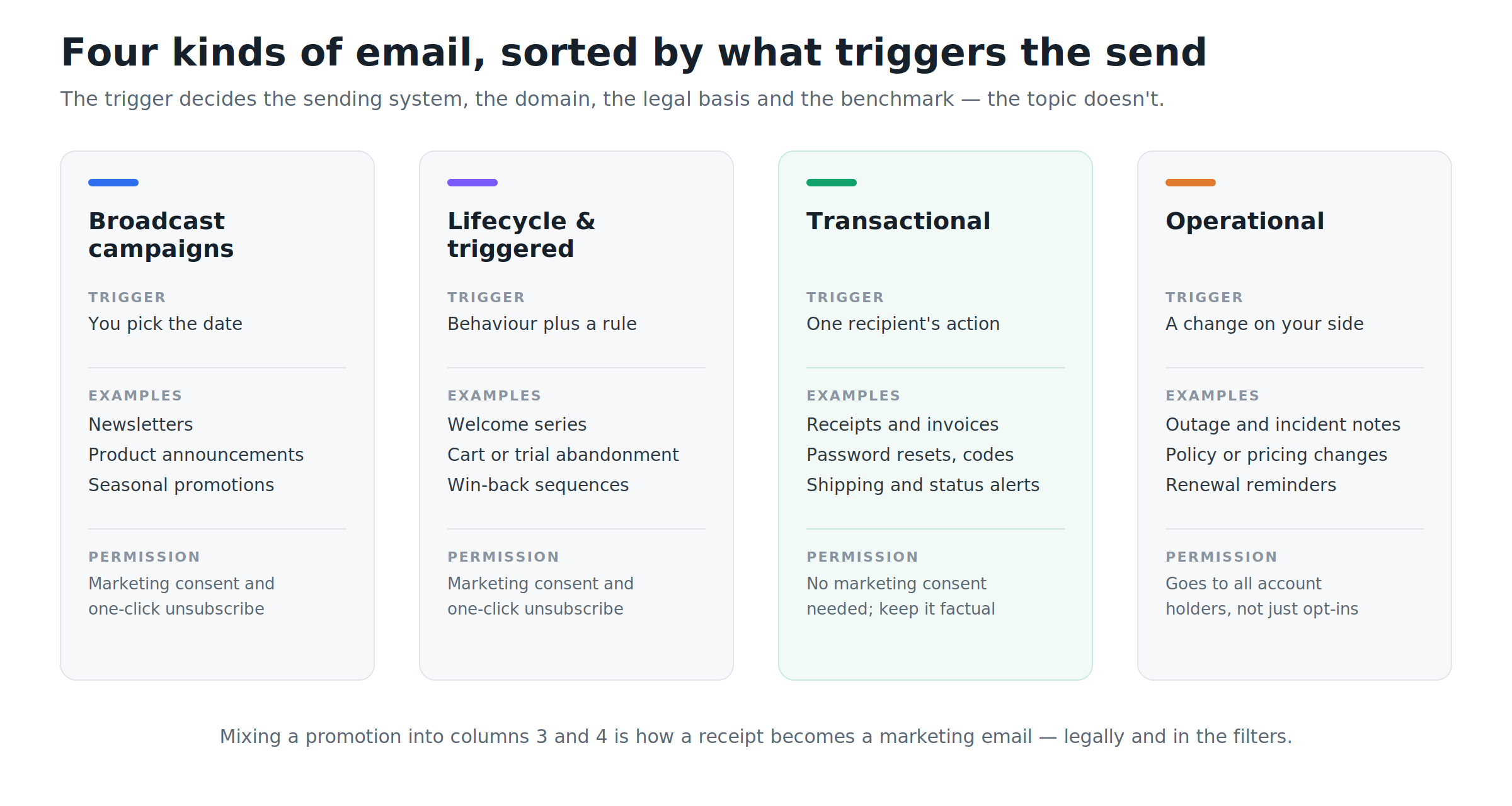
The four categories, and why the difference matters
1. Broadcast campaigns. You choose the date. Newsletters, product announcements, seasonal promotions, event invitations. The audience is a segment, not an individual, and the message is the same for everyone in it. These require marketing consent and a working unsubscribe path.
2. Lifecycle and triggered marketing email. A behaviour plus a rule causes the send: signed up but never activated, added items and left, hasn't logged in for 60 days, trial expires Thursday. Same consent requirements as broadcast, but the timing is personal rather than calendar-driven. That is exactly why these sequences tend to outperform the newsletter that goes to everyone at 9 a.m. Tuesday.
3. Transactional email. Transactional emails are triggered by one recipient's own action and carry information that person is actively waiting for: an order confirmation, a password reset, a verification code, an invoice, a shipping update, a work-order assignment. They don't need marketing consent because the recipient asked for them, and they're normally exempt from one-click unsubscribe headers, since you don't want someone accidentally opting out of their own password resets. In practice this is also the category most businesses under-invest in, despite it being the mail people genuinely open.
4. Operational email. Something changed on your side and account holders need to know: a service incident, a pricing or policy update, a renewal notice, a scheduled maintenance window. These go to everyone with an account, not just those who opted into marketing.
The line between categories 3 and 4 and the marketing categories is not cosmetic. Under CAN-SPAM, an email's obligations follow its primary purpose. Bury a 40%-off banner in a receipt and you've converted a transactional message into a commercial one, with every requirement that entails. Filters make a similar judgement. A receipt that reads like an advertisement gets treated like one.
Split your sending streams before you do anything else
If your promotional blast and your password resets leave from the same domain and the same IP pool, one bad campaign delays the mail people actually need. Separate them:
Marketing mail from a subdomain like
news.yourcompany.comTransactional mail from something like
mail.yourcompany.comor a dedicated providerBoth authenticated independently
Reputation is largely domain-based, so this contains the damage. It also lets you look at deliverability data per stream instead of averaging a complaint-prone newsletter against receipts nobody ever reports.
The authentication floor is no longer optional
Since Google and Yahoo's February 2024 rules, and Microsoft's equivalent from May 2025, the baseline for any domain sending 5,000 or more messages a day to consumer inboxes is fixed:
SPF and DKIM configured, with DMARC published at minimum
p=none, and alignment passing through SPF or DKIM.One-click unsubscribe in marketing mail via the
List-UnsubscribeandList-Unsubscribe-Postheaders (RFC 8058), with opt-outs honoured within two days.Spam complaint rate below 0.10%, and never at or above 0.30%. On a 10,000-message send that's 30 complaints, a threshold small lists cross more easily than they expect.
TLS on the connection and valid forward and reverse DNS on sending IPs.
Two details catch people out. First, once you cross the bulk-sender threshold, the classification tends to stick even if your volume drops back down. Second, the complaint rate is measured across your domain, not per platform. Using one provider for campaigns and another for transactional mail doesn't give you two separate budgets.
Enforcement has also hardened. Non-compliant mail that once got soft-failed and retried is now increasingly rejected outright, which means it never reaches the spam folder at all.
Sequence beats volume
The single highest-return change most teams can make isn't a better newsletter. It's a welcome sequence, because it reaches people during the short window when they actually remember signing up.
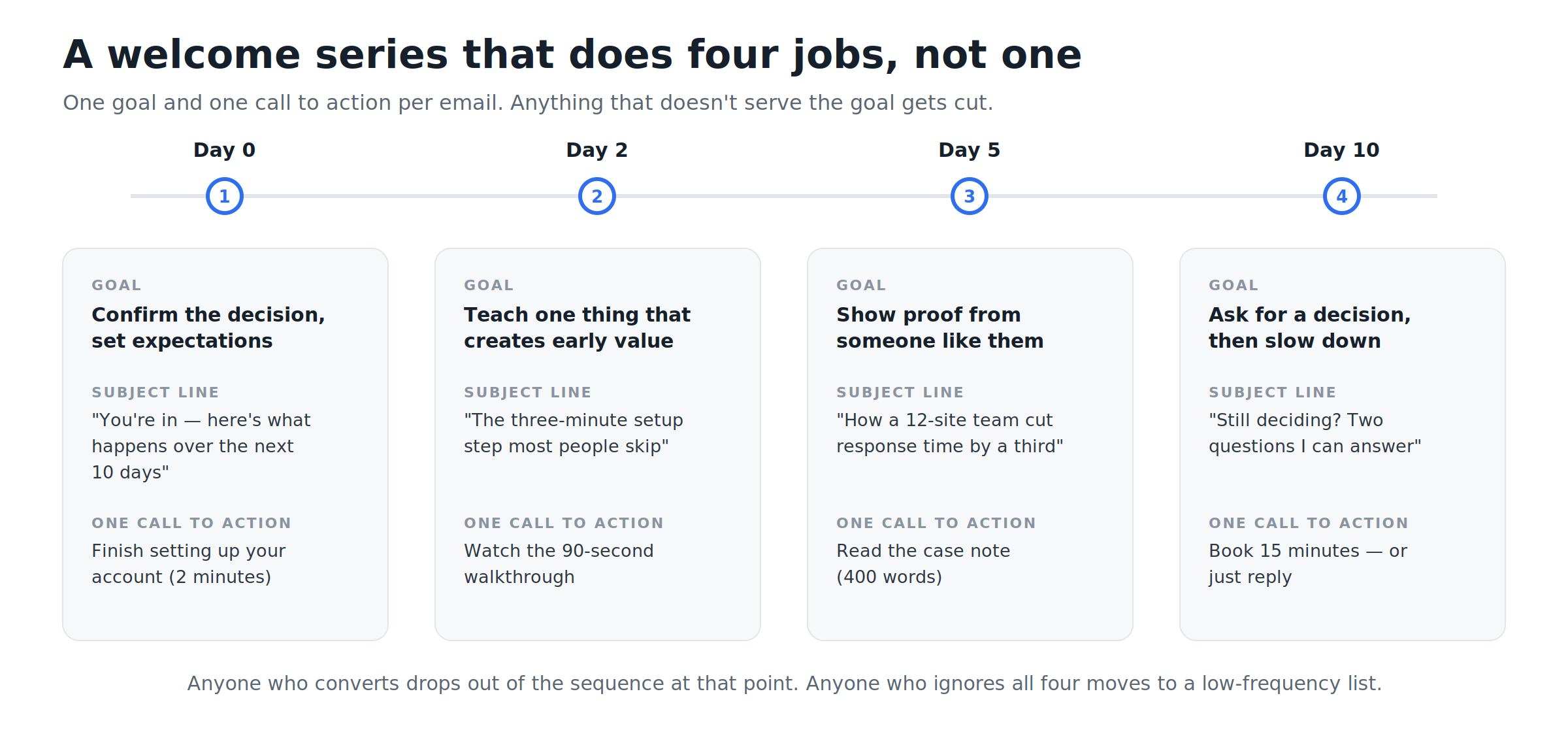
Four emails, four distinct jobs, one call to action each. Notice what isn't there: no email tries to do two things. The day-2 message doesn't also pitch an upgrade. The day-5 proof email doesn't also ask for a referral. Adding a second call to action doesn't split attention evenly. It usually costs you the first one.
Two rules make the sequence work:
Exit on conversion. Someone who books the call on day 5 should never receive day 10.
Exit on silence. Four ignored emails is a signal. Move that contact to a low-frequency list rather than continuing at full cadence, and you protect both your complaint rate and your sender reputation.
Three segments most teams can build this week
Segmentation gets over-theorised. Start with three cuts that require no data science:
Engagement recency. Bucket contacts by last meaningful interaction: clicked or logged in within 30 days, 31 to 90 days, 91 to 180 days, and longer than 180 days. Send your highest volume to the first bucket, and put the last one into a re-permission flow or suppress it. This is the single most effective lever on complaint rate.
Demonstrated interest. Viewed pricing twice, opened three emails about the same feature, downloaded the integration guide. A short, specific follow-up to a 200-person interest segment routinely beats a generic send to 20,000.
Lifecycle stage. Trialling, newly active, established, lapsed. The same product announcement needs a different framing for each: "here's what's new" for active users, "here's what changed since you left" for lapsed ones.
Measure the things that survived Mail Privacy Protection
Apple's Mail Privacy Protection pre-loads images for a large share of recipients, which means an "open" is often a proxy server, not a person. Open rate still has narrow uses, such as comparing two variants sent at the same moment to the same list, but it can't tell you whether a campaign worked.
Track these instead:
Metric | Why it earns its place |
|---|---|
Click-to-delivered rate | Requires deliberate action, so it survives image pre-fetching |
Conversion rate per send | The only number tied to the outcome you actually wanted |
Revenue or pipeline per recipient | Makes a small, engaged list comparable to a large, indifferent one |
Unsubscribe and complaint rate | Your early-warning system for frequency and relevance problems |
Net list growth | Acquisitions minus unsubscribes, bounces and suppressions |
Revenue per recipient in particular changes behaviour. A 40,000-person send producing $12,000 earns $0.30 per recipient. A 4,000-person segmented send producing $9,000 earns $2.25. The first looks bigger in a dashboard. The second is the better programme, and it generates a fraction of the complaint risk.
Test things that have a mechanism behind them
Subject-line A/B tests are cheap and mostly trivial. The variables with real leverage are:
Offer: what you're actually giving people
Timing: sending relative to the trigger event rather than the calendar
Segment: who receives it at all
Frequency: the variable nobody tests and everybody guesses
Before running any test, work out whether your list is large enough to detect the effect you care about. Detecting a lift from 2.0% to 2.4% click rate at conventional confidence needs tens of thousands of recipients per arm. Below that, you'll get results that look decisive and won't replicate. In small-list situations, run the change to everyone for a month and compare against the prior period instead of pretending you ran an experiment.
A four-week sequence to put this in place
Week 1: Foundations. Publish SPF, DKIM and DMARC. Split marketing and transactional sending domains. Set up Google Postmaster Tools and check your baseline complaint rate. Purge hard bounces and role addresses.
Week 2: Welcome series. Build the four-email sequence with exit conditions. This is the highest-return week of the four.
Week 3: Segments. Create the engagement-recency buckets. Move the 180-day segment into a single re-permission email, then suppress non-responders.
Week 4: Measurement. Set your baseline on click-to-delivered, conversion and revenue per recipient. Pick one meaningful test (offer, timing or frequency) and schedule it.
Four mistakes worth naming
Sending marketing on the transactional stream. It works right up until it doesn't, and the failure lands on password resets.
Treating unsubscribes as losses. An unsubscribe is a cheap, clean exit. A spam complaint from the person you wouldn't let leave costs you far more.
Buying or scraping lists. Purchased contacts never opted in, complain at high rates and can burn a domain reputation that takes months to rebuild.
Sending on a calendar rather than a trigger. "It's the first Tuesday" is not a reason your reader cares about. "You just did something" is.
Sort by trigger, fix the authentication floor, build the sequence, then measure the numbers that reflect outcomes rather than pre-fetched images. That order matters, because the cleverest campaign in the world doesn't help if it never reaches the inbox.

