Every classroom, court, and corridor: covered.
Maintainly gives school facilities teams a simple way to manage work orders, schedule maintenance during school holidays, and let teachers log requests. From a single primary school to a multi-campus university, it's up and running in just minutes, not days or months.


 Join
1,200+
maintenance teams in
110+
countries
Join
1,200+
maintenance teams in
110+
countries

Schools & education work order tools
School campuses generate maintenance requests from every direction: teachers flagging a broken projector, admin reporting a faulty lock, caretakers responding to issues across multiple buildings. Maintainly pulls every request into one place so nothing slips through.
- Let teachers and admin submit maintenance requests via a simple portal
- Assign and prioritize work orders across buildings, grounds, and facilities
- Attach photos to work orders so your caretaker knows exactly what they're walking into
- Set up recurring maintenance tasks to run during school holidays when classrooms are free

Know what you have, where it is, and when it was last serviced
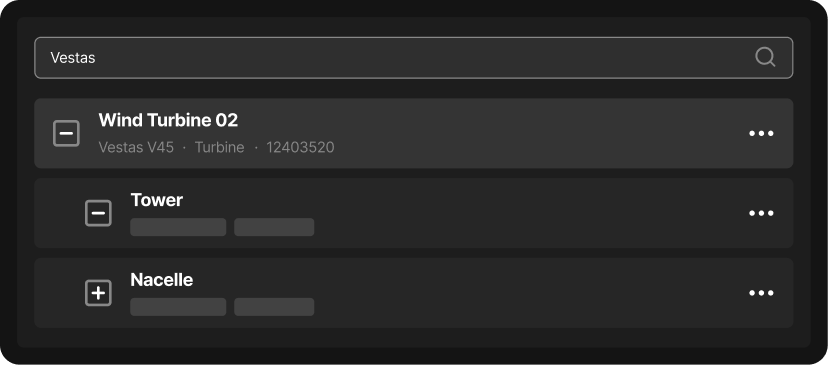
A school campus has hundreds of assets spread across buildings, grounds, and specialist facilities, and in education many of them carry compliance obligations. Maintainly gives you a clear picture of every asset, with a full service history behind each one.
- Attach QR code labels to assets (from HVAC units to playground equipment) and pull up records instantly
- Track assets across multiple buildings, campuses, or sites in a single system
- Maintain a complete audit trail for every asset, meeting your OH&S and duty of care obligations
- Log science lab equipment, kitchen appliances, and specialist facilities alongside your building infrastructure
Still tracking maintenance in a spreadsheet or paper logbook?
School facilities teams are often small, budgets are tight, and no one has time for a six-month software rollout. Maintainly is designed to get out of your way and start saving your team time from day one.
- Get Maintainly set up in minutes: no IT department required, no months-long implementation
- Your whole team gets support as part of every plan, at no extra cost
- So simple to use that fewer than 2% of users ever request training
- Only pay for the modules your school actually needs, not locked into features you'll never use
The CMMS your budget, and your caretaker, will thank you for.
Get started in minutes, not days
A school can't afford to spend weeks implementing new software, especially when term is underway and your caretaker has work orders piling up. Maintainly is designed to be live and useful from day one. Most teams are logging their first work orders within the hour, with no IT support needed.
Built for education teams of any size
Whether you're a single early childhood center with one part-time caretaker or a university managing maintenance across a dozen campuses, Maintainly scales to fit. Start simple with work orders and assets, and add modules as your needs grow, without switching to a different system.
Lowest total cost of ownership
School facilities budgets are tight. Maintainly's pricing is transparent and modular: you only pay for the features you actually use, with no hidden implementation fees or mandatory annual contracts. Smaller schools can start on the free tier and only upgrade when they're ready.
Dynamic, not a dinosaur
Most CMMS platforms were built for heavy industry and retrofitted for education: the result is clunky interfaces, slow rollouts, and systems your caretakers won't actually use. Maintainly is mobile-first, updated continuously, and built to be picked up by anyone on your team without training. That means faster adoption, faster ROI, and no expensive consultant required.
Free
- Mobile CMMS app
- Repeating work orders
- Checklists
- Meter readings
- Task templates
- Unlimited request users
- Asset QR labels
Small Business
Everything in Free, plus:
- Unlimited audit trail
- Unlimited work requests
- Unlimited checklists
- Work order approval
- Custom fields (assets & parts)
Enterprise
Everything in Small Business, plus:
- Unlimited preventative maintenance
- Unlimited reports
- API access
- Dedicated account manager
- Priority support
Inventory Add-on
- Spare part inventory management
- Inventory barcoding
- Cycle counts
- Purchase orders & stock transfers
- Stock shipments and backorders
Timesheets Add-on
- Auto-populate timesheets with work order data
- Capture non-work-order hours in timesheets
- Overtime, banked hours & allowances
- Timesheet approvals
Savvy CMMS
customers

Maintainly.
Frequently Asked Questions
What's the biggest maintenance challenge for schools compared to other industries?
Schools have to compress major work into the long break between academic years, because buildings can't be shut down for an HVAC overhaul or roof replacement while classes are running. That makes the break a hard deadline: every project needs tight scheduling and tracking so air conditioning, fire systems, and plumbing are all confirmed ready before students return, with no missed work order left to surface in the first week back.
What kinds of assets does a school or district actually track in a CMMS?
Typically HVAC units, boilers, and rooftop equipment; plumbing and electrical systems; fire alarms, extinguishers, and sprinkler systems; playground equipment; kitchen and cafeteria equipment; gym and athletic facility equipment; roofing; and, for colleges and universities, dorm systems and elevators. Each asset gets its own maintenance history and location within the school or building, often tagged with a QR code so staff can scan it on-site instead of hunting for a paper ID.
How does day-to-day maintenance work actually flow in a school building?
Most schools run two parallel streams through one small team: custodial requests (a spill, a broken chair, a clogged sink) and facilities/maintenance work orders (HVAC repair, a roof leak, an electrical issue), each needing different tracking and urgency. Teachers and staff typically submit issues through a simple request portal rather than calling the front office, and the maintenance team triages, assigns, and closes them out from a mobile app while walking the building.
Why do paper forms and spreadsheets break down for school maintenance specifically?
They can't keep up with a district running dozens of buildings and hundreds of assets on a skeleton crew, so requests get lost in email or on sticky notes and nobody can see what's overdue. A spreadsheet also has no audit trail for a fire system inspection or a playground safety check, which becomes a real problem when a district has to show a board or auditor exactly what was done and when.
Why does student and child safety make maintenance tracking more important in schools than in most workplaces?
Because the people in the building every day are children, safety-critical assets like fire systems, playground equipment, and door/window locks need documented, on-time inspections rather than a best-effort check. A CMMS gives a district a timestamped record (who inspected what, when, and what was fixed) that protects kids and gives administrators something concrete to point to if a safety question ever comes up.
What is a CMMS, and why would a school district need one instead of just calling a handyman when something breaks?
A CMMS (computerized maintenance management system) is software that tracks a facility's assets, schedules preventive maintenance, and manages work orders from request to completion. A school district needs one because it's managing dozens of buildings and thousands of assets on a fixed budget tied to the academic year, and reactive "call someone when it breaks" maintenance costs more over time than catching small issues (like a failing HVAC filter) before they become an emergency during the school day.
Is maintenance software realistic for a school's facilities and custodial staff to actually adopt, and what does it cost?
Yes. Enterprise-grade CMMS platforms expect a procurement and rollout cycle measured in months, which rarely fits either a school budget or an academic calendar. Maintainly is usually set up in minutes, and only about 2% of customers need any training before facilities and custodial staff are working in it. There is a free plan, with inventory and timesheets as optional add-ons, easier for a school board to approve than a bloated enterprise contract, and setup help is included rather than sold separately. The Pricing page has the current plans.

