A Complete Breakdown of the New UI Features and Functional Improvements in Maintainly CMMS
 By Gui
Modern maintenance teams don’t just need more features. They need software that feels fast, clear, and EASY TO USE every single day. That’s exactly why Maintainly recently rolled out its brand-new UI. It is a functional upgrade designed around how maintenance work actually happens.
This new interface touches everything: how you move through the system, how quickly you find information, how data is presented, and how easily Maintainly can grow with your operation. Whether you’re a one-person maintenance team or managing hundreds of technicians across multiple sites, the new UI is built to support you now and into the future.
Here’s a complete breakdown of what’s new, what’s improved, and why it matters.
A UI Designed for How Maintenance Teams Really Work
Maintenance environments are busy, unpredictable, and data-heavy. The new Maintainly UI was rebuilt to reduce friction in those moments when speed and clarity matter most.
The focus was simple:
Fewer clicks
Cleaner layouts
Better visibility of what needs attention
Consistent navigation across every screen
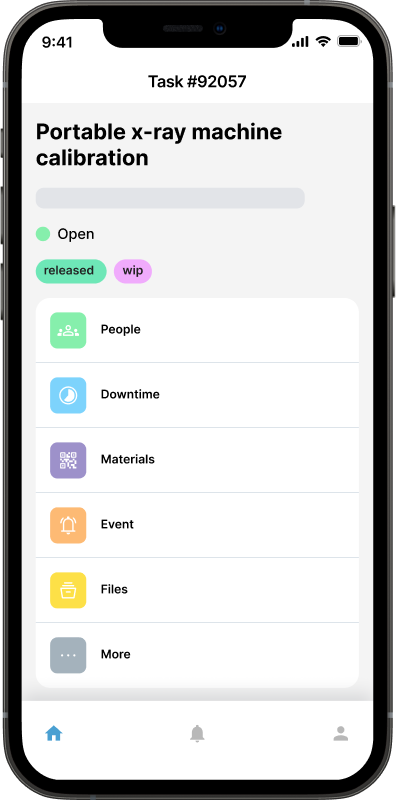
Instead of forcing users to adapt to software, the interface adapts to real-world workflows, whether you’re responding to a breakdown, reviewing reports, or planning preventative maintenance weeks ahead.
Latest Upgrades in Maintainly CMMS You’ll Love
1. Faster Navigation and Smarter Layouts
One of the most noticeable improvements is how quickly you can move around the platform.
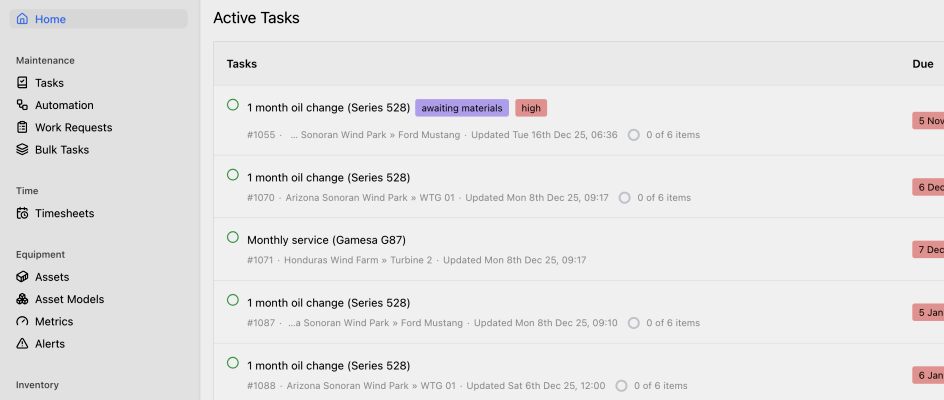
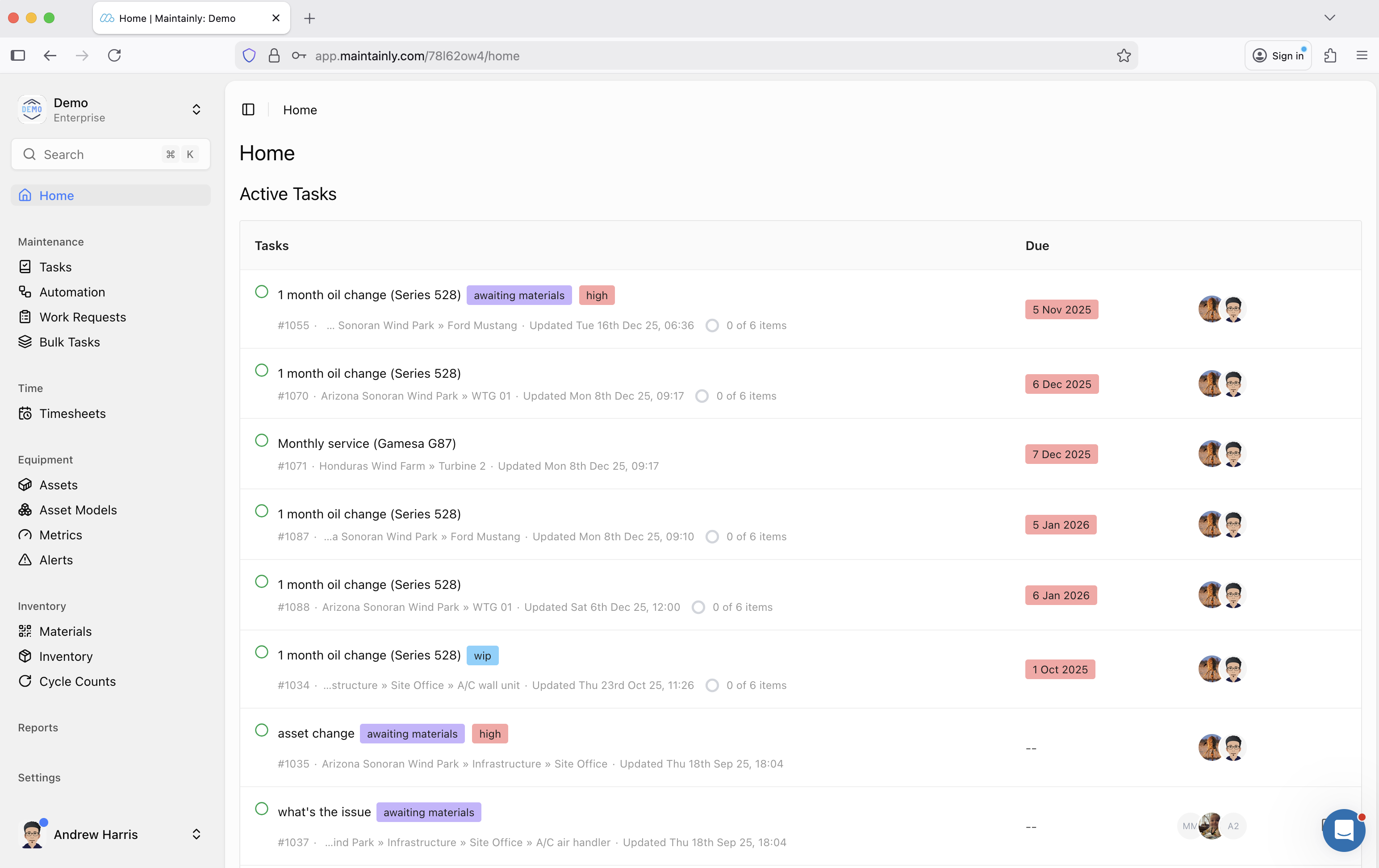
Streamlined Sidebar Navigation: The new sidebar is cleaner and more organized, making it easier to jump between work orders, assets, inventory, reports, and settings without hunting through menus. Key sections are grouped logically, so even new users can find what they need without training manuals.
Improved Search Experience: Search is faster and more reliable, helping you locate work orders, assets, parts, or locations in seconds. This is especially valuable for teams managing thousands of assets or high work order volumes.
Consistent Page Structure: Every page now follows a consistent layout. Once you learn one section, the rest of the platform feels familiar. This reduces mental effort and helps teams work confidently across different modules.
2. Cleaner Visual Hierarchy That Reduces Cognitive Load
Maintenance software can easily become overwhelming. The new UI puts visual clarity first.
Better Use of Space: Spacing, typography, and alignment have been redesigned to make screens easier to scan. Important data stands out, while secondary details stay accessible without cluttering the view.
Clear Prioritization: Open work orders, overdue tasks, meter readings, downtime data, and inventory alerts are easier to spot at a glance. This helps teams focus on what actually needs action, instead of digging through noise.
Consistent Labels and Icons: Icons, labels, and colors are used consistently across the platform. This small change makes a big difference when teams are switching between tasks quickly throughout the day.
3. Mobile-First, Desktop-Efficient Experience
The new UI was built with a mobile-first mindset, without sacrificing desktop performance.
Better Browser Experience on Mobile: Technicians using the web app on phones or tablets (ie. on the web browser on a mobile device) will notice smoother interactions, clearer layouts, and fewer pinch-and-zoom moments. This is especially useful for teams entering timesheets, updating work orders, or scanning asset QR labels directly from a browser.
Desktop Power for Deep Work: On larger screens, the interface makes better use of available space. Reports, asset hierarchies, and inventory data are easier to review without constant scrolling or switching views.
4. Accessibility Improvements for Real-World Use
Good maintenance software should work for everyone. The updated UI includes meaningful accessibility upgrades that improve usability across the board.
Improved color contrast for better readability
Enhanced keyboard navigation
Better screen-reader support
More forgiving interaction zones for touch devices
These improvements make the platform easier to use in challenging environments like factory floors, warehouses, or outdoor sites.
5. Work Order Management Feels Faster and More Intuitive
Work orders sit at the heart of Maintainly, and the new UI makes managing them smoother from start to finish.
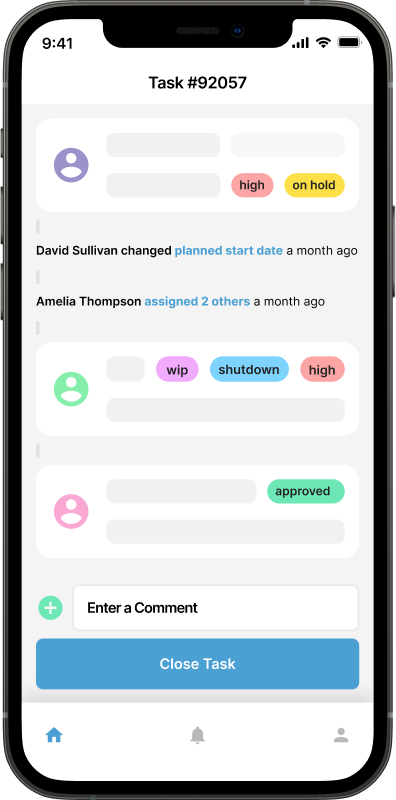
Clearer Work Order Views: Key details like status, priority, assigned technicians, checklists, and due dates are easier to read and update. Attachments, comments, and audit trails are more clearly organized.
Improved Workflow Visibility: Custom workflow labels and approval steps are easier to follow, helping teams understand exactly where a job stands without opening multiple screens.
Time Tracking That Just Works: Time entries feel more natural, with clearer entry points and better visibility into tracked hours, downtime, and labor data.
 6. Asset Management with Better Context and Visibility
Managing assets at scale requires clarity. The new UI supports this with cleaner asset views and better data organization.
Logical Asset Hierarchies: Location and asset hierarchies are easier to navigate, even for large or complex facilities.
Maintenance History at a Glance: Service history, meter readings, warranties, depreciation, and past work orders are easier to review, helping teams make smarter maintenance decisions.
QR Code Scanning Made Simple: Asset QR label scanning integrates smoothly into the workflow, making it faster to identify equipment and log work on the spot.
7. Inventory and Purchasing Made More Manageable
Inventory is often where CMMS systems feel clunky. Maintainly’s updated UI simplifies this experience.
Clearer Inventory Screens: Spare parts, stock levels, and consumption data are easier to understand, reducing the risk of over-ordering or stockouts.
Better Purchasing Workflows: Purchase orders, stock transfers, shipments, and backorders flow more naturally, especially when combined with barcode scanning and cycle counts.
Modular Add-On Design: Inventory tools remain modular, so teams only pay for and use what they actually need, so if you don't require the advanced inventory features, never fear...you won't be paying for them!
8. Timesheets That Fit Real-World Work Patterns
For teams using the Timesheets add-on, the UI upgrade brings noticeable improvements.
Auto-population from work orders feels smoother
Non-work-order hours are easier to log
Over time, allowances, and banked hours are clearer
Approval workflows are easier to manage
This makes timesheets less of a chore and more of a reliable data source for payroll and reporting.
9. Reporting and Analytics Built for Growth
One of the biggest long-term benefits of the new UI is what it unlocks behind the scenes.
Cleaner Reports Today: Filtering, exporting, and reviewing reports feels faster and less cluttered. Whether you’re looking at work performance, asset reliability, or downtime trends, the data is easier to interpret.
A Foundation for Richer Dashboards: The rebuilt UI supports more advanced analytics, clearer charts and dashboards, all without overwhelming the user.
One Giant Leap Forward for CMMS in 2026!
The UI aligns perfectly with Maintainly’s pricing and modular philosophy.
Whether you’re on the Free plan, Small Business plan, or Enterprise plan, the interface scales with you. You get the same clean experience, with features unlocking as your needs grow.
Maintainly’s new UI isn’t just easier on the eyes. It’s faster, clearer, and built to support real maintenance work at every scale.
You’ll notice:
Less time navigating
Faster access to critical information
Cleaner workflows across work orders, assets, inventory, and timesheets
A platform that feels ready for what’s next
This redesign is a major milestone, but it’s only the start. If you haven’t explored the new UI yet, now’s the perfect time.
Try Maintainly free for 14 days. No credit card required.
Further Reading

What Does CMMS Stand For? Acronym and Meaning
What the CMMS acronym stands for, what the software records once a team has one, and where the category stops.
Read more →
Benefits of CMMS
CMMS will aid and inform technicians out in the field, as well as decision makers, on maintenance work that has been done, will be done soon, or is planned to be done in the future. Broadly speaking, the benefits of CMMS can be broken down into three categories: management; visibility; and cost control.
Read more →
What is the 75% Maintenance Rule in Asset Management: When to Repair or Replace
What exactly is the 75% maintenance rule, how is it applied, and why should it be integrated into your Computerized Maintenance Management System (CMMS)?
Read more →